11. Webhook Configuration & Payload
SADAD provides a Webhook mechanism to notify merchants about transaction events independently of customer redirection or callback URL execution.
Webhooks are particularly useful in scenarios where:
- The customer closes the browser or app
- Redirection to the callback URL does not occur
- The merchant requires a reliable server-side notification
Webhook vs Callback (Important Difference)
| Callback URL | Webhook |
|---|---|
| Triggered after checkout flow | Triggered immediately after transaction creation |
| Depends on customer browser/app | Independent of customer behavior |
Form POST (x-www-form-urlencoded) | JSON POST |
| Used for final order update | Used for early & reliable notification |
Merchants are recommended to support both mechanisms.
Webhook Configuration
-
Log in to the SADAD Merchant Panel
👉 https://panel.sadad.qa -
Ensure Online Payments is selected
-
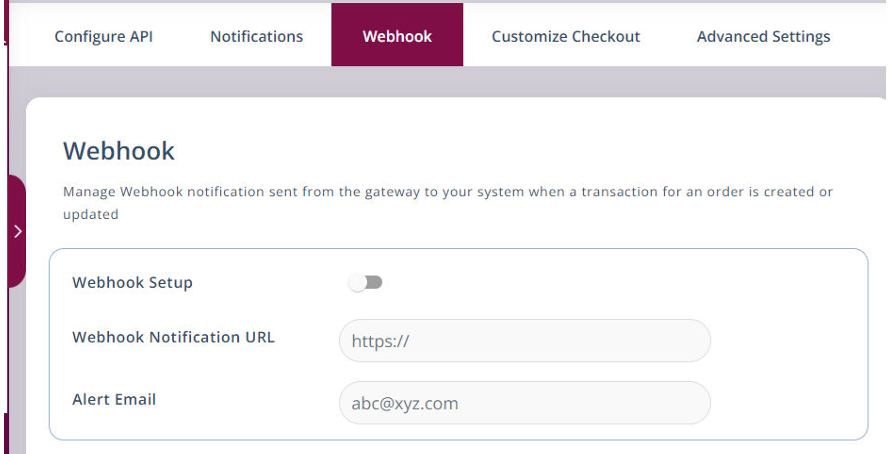
Navigate to Payment Gateway → Webhook
-
Enter your Webhook URL
-
Save the configuration
SADAD Merchant Panel – Webhook configuration screen
Webhook Payload Format
Webhook notifications are sent via HTTP POST with a JSON body.
{
  "invoiceNumber": "SD64573479587",
  "isTestMode": 0,
  "merchantId": "123567",
  "message": "success",
  "transactionNumber": "SD2418209648273",
  "transactionStatus": 3,
  "txnAmount": 5,
  "websiteRefNo": "SD3214578995",
  "checksumhash": "d5d33a4f3871a615ebf20d09aea43e866f4f602e01543bbe4bcd4c1cc93a0d03"
}
Webhook Parameters Explanation
| Parameter | Description |
|---|---|
| invoiceNumber | Available only for invoice-based transactions |
| isTestMode | 1 = Test, any other value = Live |
| merchantId | SADAD Merchant ID |
| message | success / failed |
| transactionNumber | SADAD transaction reference |
| transactionStatus | 1 = In Progress, 2 = Failed, 3 = Successful |
| txnAmount | Transaction amount |
| websiteRefNo | Merchant order reference |
| checksumhash | Signature to verify authenticity |
Verifying Webhook Authenticity
- Extract and temporarily store
checksumhash - Remove
checksumhashfrom the payload - Sorts remaining parameters by key in ascending order
- Prefix with your Secret Key
- Append parameter values only
- Generate SHA256 hash
- Compare with received checksum
If matched, the webhook is trusted.
Replay Attack Handling (Important)
A replay attack occurs when a previously valid webhook message is resent by an attacker to trigger duplicate processing.
To protect against replay attacks, merchants must implement idempotent handling:
- Store and track
transactionNumber(orinvoiceNumber) - Process each transaction only once
- If a webhook is received again for the same transaction, safely ignore it
⚠️ A replayed webhook will still have a valid checksum. Checksum validation alone does not prevent replay attacks.
Required Response Behaviour
Even if:
- The checksum is invalid
- The order reference does not match
- The webhook is a duplicate (replay)
You must always return:
HTTP/1.1 200 OK
Returning non-200 responses may cause SADAD to retry delivery and may increase replay risk.
Webhook Acknowledgement (Mandatory)
Your server must respond with:
{ "status": "success" }
Webhook signature verification uses the same SHA256 logic as request signature generation.
For hashing examples in multiple languages, refer to: Signature Generation (Request)